A Python Mad Libs project is creative, immediately rewarding, and surprisingly instructive. In about an hour, your kid can write a program that generates a silly story, complete with a password gate to keep it "secure." No prior project experience needed, just variables, strings, and a sense of humor.
Here's how to build it, step by step.
What is a Python Mad Libs project?
For the uninitiated, Mad Libs are stories written out with a few words missing throughout. The reader chooses a series of words to fill in the blanks, creating a silly (and often ridiculous) final story.
In a Python Mad Libs project, each missing word becomes a variable. Your child will write the story framework in code, assign values to each variable (like "dragon" for character type or "happy" for an adjective), and then use string concatenation to weave those variables into the final story.
Here's what the output looks like—first the story template with variables in brackets, then the finished tale:
Once upon [char] time, there was [char] [adj1] [mythicalAnimal] named [characterName]. [characterName] was [char] [str(age)] years old and lived by the [place1]. He [pastTenseVerb1] [pluralNoun1] and [pluralNoun2]. People thought [characterName] was too [adj1]. The people sent [secondCharacterName], the village's [secondCharacter], to [action] the [mythicalAnimal]. [characterName] thought that [pastTenseVerb2] [adj2], so he left the [place1]. Now he lives in the [place2] and eats the [pluralNoun1] and [pluralNoun2] there instead.
Each word in brackets is a variable, which can be set manually in Python code or collected from user input. For this tutorial, we will set them directly in the code, and then add a password system so only people who know the secret can read the story.
By the end of this tutorial, your child will:
- Plan and write a Mad Libs story from scratch
- Use variables and data types to program the story
- Combine strings with the
+operator (string concatenation) - Learn the importance of passwords and create a password system for the program
It's a beginner-friendly project that teaches real programming concepts—without feeling like a textbook exercise.
Plan your Mad Libs Story on Paper First
Before writing any code, your teen will outline the story on paper. This isn't busywork! It's how real developers plan before they code.
Brainstorm your story elements
Think of the different elements you want in your story. You'll need to create variables for each of the following:
- Character Type (e.g., "Dragon")
- Character's Name (e.g., "Flare")
- Second Character's Name (e.g., "Geoff")
- Second Character's Occupation (e.g., "butcher")
- First Setting Place (e.g., "sea")
- Second Setting Place (e.g., "city")
- Plural Noun (e.g., "trees")
- Another Plural Noun (e.g., "bushes")
- Action (e.g., "fight")
- Adjective 1 (e.g., "happy")
- Another Adjective (e.g., "unpleasant")
- Past Tense Verb (e.g., "ate")
- Another Past Tense Verb (e.g., "sounded")
- Single Letter or Symbol (e.g., "a")
You can also add more elements to make the story longer or more detailed.
Write a 6–8 line story outline
- Write a 6–8 line story on paper.
- Decide which words you'll replace with variables.
- Share your story idea with a classmate or family member (optional, but helpful for catching plot holes or awkward phrasing).
For example, here are seven lines about a dragon:
Once upon a time, there was a happy dragon named Flare.
Flare was 1000 years old and lived by the sea.
He ate trees and bushes.
People thought Flare was too happy.
So the people sent Geoff, the village's butcher, to fight the dragon.
Flare thought that sounded unpleasant, so he left the sea.
Now, he lives in the city and eats the trees and bushes there instead.
Notice how words like "happy," "dragon," "Flare," "sea," and "city" will become variables in the code.
Set up the Python File and Declare Variables
After outlining the Mad Libs story, it's time to write it into code.
Step 1: Create a new Python file
In your Python_Intro directory, create a new Python file called mad_libs_story.py.
Step 2: Declare variables for each story element
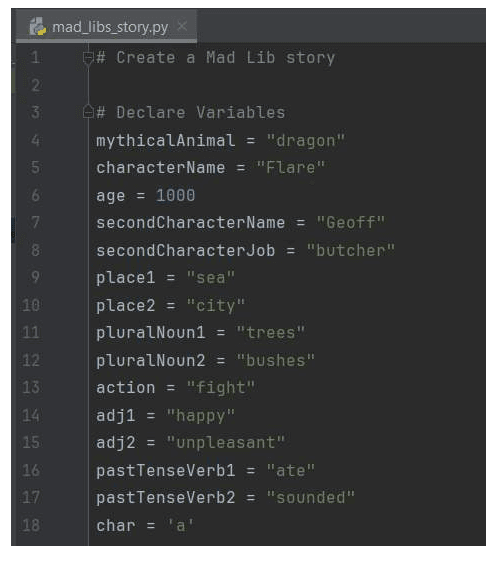
At the top of the file, declare a variable for each of the Mad Libs elements you brainstormed.
Step 3: Add a value to each variable
Assign a value to each variable. For example:
char = "a"
mythicalAnimal = "dragon"
characterName = "Flare"
adj1 = "happy"
age = 1000
place1 = "sea"
pastTenseVerb1 = "ate"
pluralNoun1 = "trees"
pluralNoun2 = "bushes"
secondCharacterName = "Geoff"
secondCharacter = "butcher"
action = "fight"
pastTenseVerb2 = "sounded"
adj2 = "unpleasant"
place2 = "city"
Write the Story Using String Concatenation
Step 4: Create a variable called story and combine strings
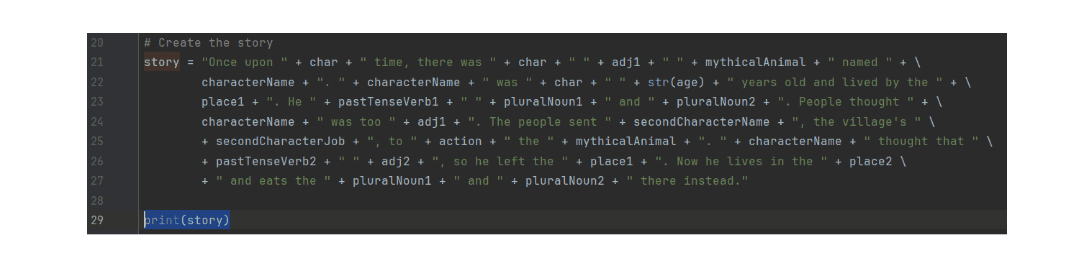
Now you'll write your Mad Libs story by combining strings (the fixed text) and variables (the words that change) using the + operator.
story = "Once upon " + char + " time, there was " + char + " " + adj1 + " " + mythicalAnimal + " named " + characterName + ". " + characterName + " was " + char + " " + str(age) + " years old and lived by the " + place1 + ". He " + pastTenseVerb1 + " " + pluralNoun1 + " and " + pluralNoun2 + ". People thought " + characterName + " was too " + adj1 + ". The people sent " + secondCharacterName + ", the village's " + secondCharacter + ", to " + action + " the " + mythicalAnimal + ". " + characterName + " thought that " + pastTenseVerb2 + " " + adj2 + ", so he left the " + place1 + ". Now he lives in the " + place2 + " and eats the " + pluralNoun1 + " and " + pluralNoun2 + " there instead."
Notice the str(age) wrapper—since age is an integer, you need to convert it to a string before concatenating it with the rest of the text.
Step 5: Print the story to test your code
Add this line at the end of your file:
print(story)
Test and run the Mad Libs Program
Step 6: Run your code
At the top navigation bar, select Run > Run, then click mad_libs_story.
Step 7: View the console to see your Mad Libs story
Your story should print in the console, with all the variables filled in. If you used the dragon example, you'll see:
Once upon a time, there was a happy dragon named Flare. Flare was a 1000 years old and lived by the sea. He ate trees and bushes. People thought Flare was too happy. The people sent Geoff, the village's butcher, to fight the dragon. Flare thought that sounded unpleasant, so he left the sea. Now he lives in the city and eats the trees and bushes there instead.
Add Password Protection
Adding a protected password will ensure the story is more secure and not easily accessible. You'll use conditional statements to check if the input password is correct before displaying the story.
Setting up the password
Step 1: Remove the print(story) line from the code.
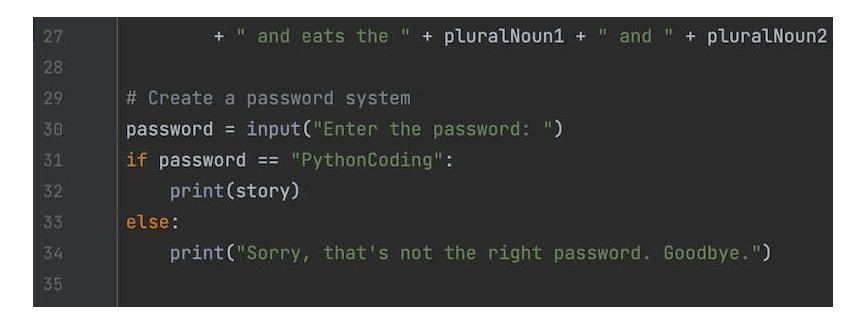
Step 2: Below your the variable, declare a password variable and assign the value as the input() command to let the user enter a password.
password = input("Enter the password: ")
Step 3: Create an if statement to check whether the user input matches the password.
if password == "your_secret_password":
Step 4: In the if statement, print the story if the correct password is entered.
if password == "your_secret_password":
    print(story)
Step 5: After the if statement, create an else statement.
Step 6: In the else statement, print an access denied message.
else:
    print("Access denied. Incorrect password.")
Test your password
Step 1: Run your code. In the console, enter the correct password and press enter to view your story.
Step 2: Run your program again and enter the wrong password. You should see the "Access denied" message instead of the story.
What you've built (and what's next)
Your child just built a working Python project—one that's both silly and surprisingly educational. They've practiced variables, data types, string concatenation, and conditional logic, all while creating something they can actually share (password required, of course).
This is the kind of project that makes coding click. It's creative, it's immediately rewarding, and it's a foundation for bigger things like text-based adventure games, chatbots, or even web apps that collect user input and generate custom content.
Ready to keep building? iD Tech offers Python courses for kids and teens that take these foundational skills further into game development, data science, and AI projects.


